Your pension,
worked out
from the
documents.
An overtime log, a pay-check estimate and a pension model for New York City police officers, built from the Fund's plan summaries, the OLR salary sheets and the duty-schedule orders. It runs on your phone. Nothing you type leaves it. The beta models Tier 3 (appointed on or after 1 July 2009) and Tier 2 (appointed before that date); Tier 2 is new and in testing.
A modeling and education tool, not financial advice. Every figure is an estimate; the official number comes from the NYC Police Pension Fund. Independent. Not affiliated with or endorsed by the New York City Police Department, the City of New York, the Police Pension Fund or any union.
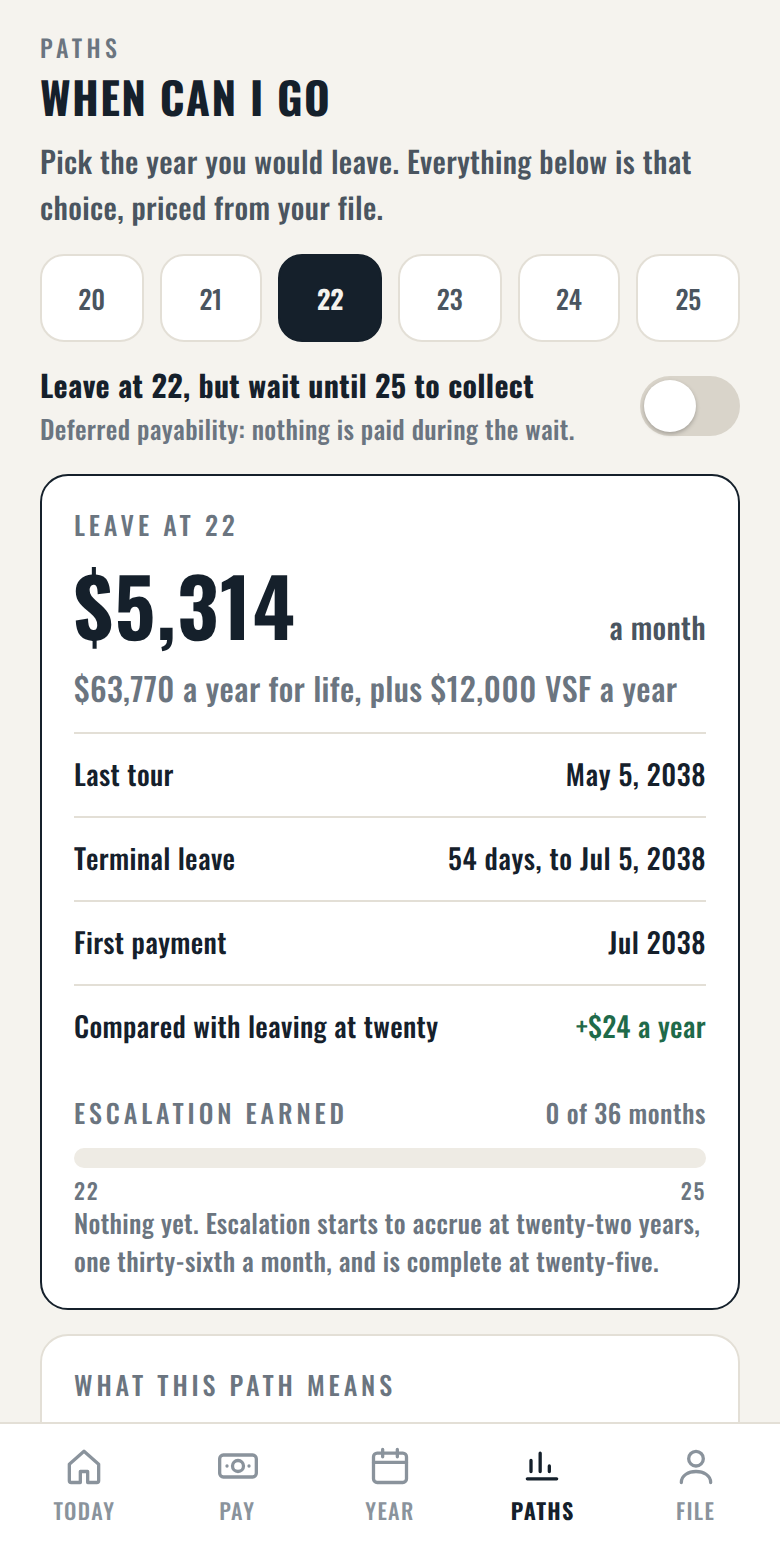
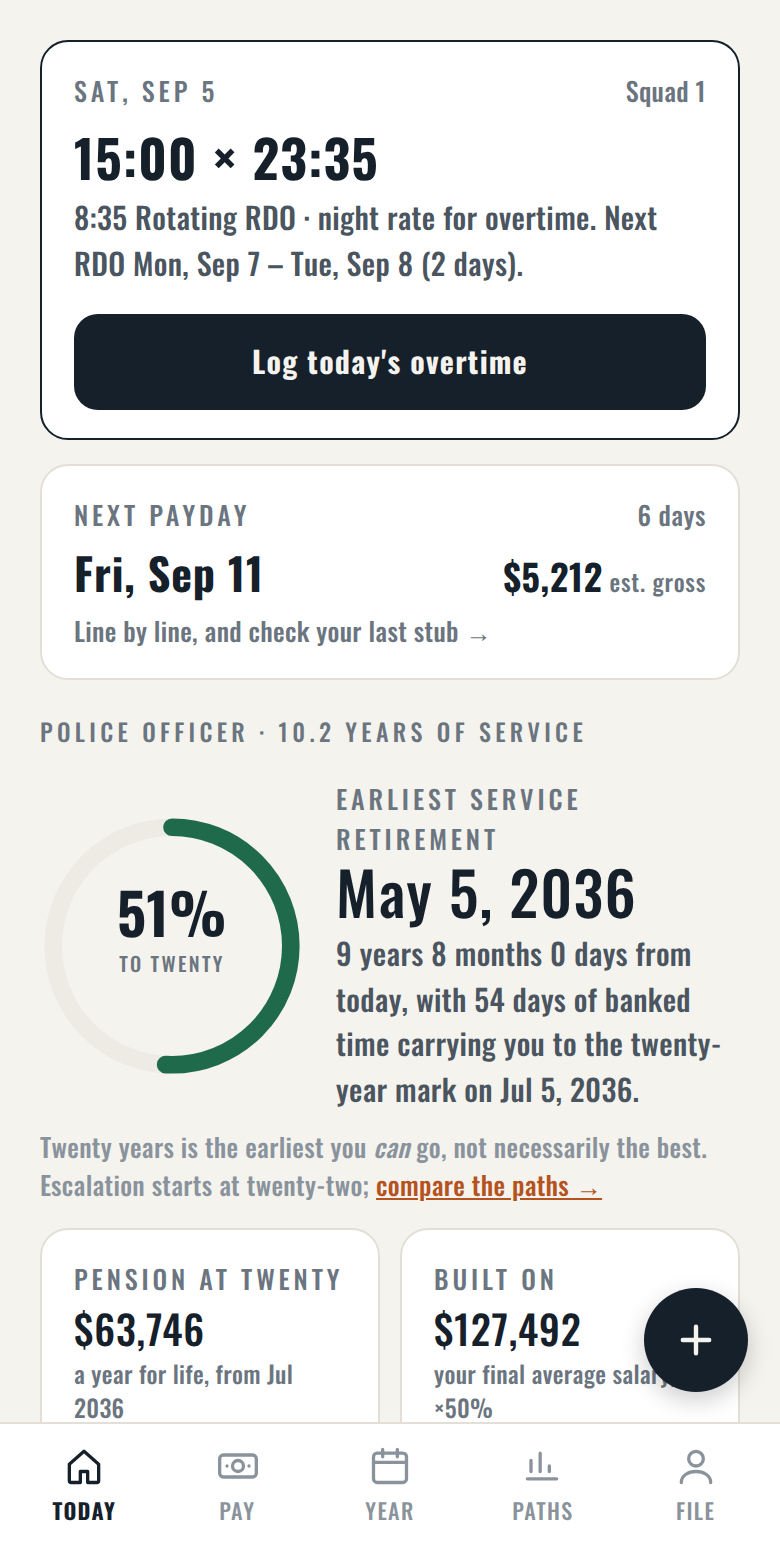
Twenty is the service-retirement mark. The app shows what each year after it is worth.
Service and vested pensions are reduced at 62 by half of your primary Social Security benefit (the Social Security offset). A military or prior police/fire buyback moves every marker earlier; days off the payroll move them later. Source: NYC Police Pension Fund, Tier 3 Summary Plan Description, June 2026. Estimates only; the official figure comes from the Fund.
Leaving at twenty and starting the pension later
Some members plan to leave at twenty and start the pension at what would have been 22 to 25 years, so that it comes with escalation. The plan summary is clear about what the wait costs: no pension check, no $12,000 Variable Supplement, and no City health insurance for you or your family until the first check, and no death benefit while you wait. Your contributions stay locked in. How a pension that starts later is worked out is not yet settled in writing, so the app treats this path as not confirmed, shows it only if you turn it on, and lists what the wait costs you month by month. Ask the Pension Fund about it when you file.
Tier 2 figures are new and in testing. Account amounts that the Fund converts to pension with its own age factors are shown in dollars and left out of the pension figure unless you enter the factor from a Fund estimate. Source: NYC Police Pension Fund, Tier 2 Summary Plan Description, June 2026; Retirement and Social Security Law §443 as amended by Chapter 312 of 2026; NYC Administrative Code, Title 13. Estimates only; the official figure comes from the Fund.
Three things it does every day, and one it does once
Log a tour in three taps
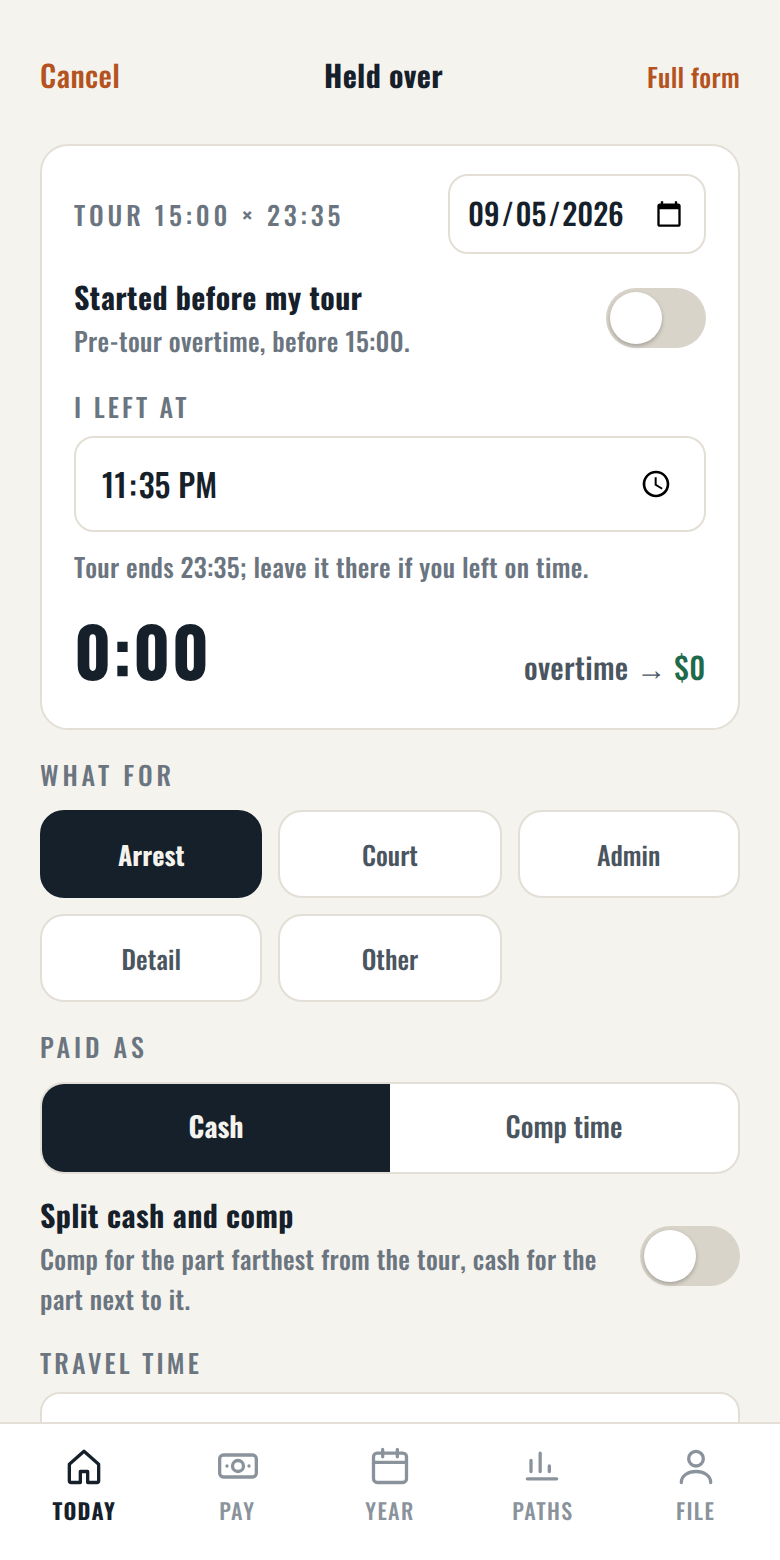
The app knows your chart, so today's tour is already filled in on the Log tab. Say when you left (or started early), what it was for, cash or comp, and it prices the hours at your printed day or night rate, splits cash and comp the way your slip does, and tells you which check the money lands in. Lost time, a worked vacation day and a recall between tours have their own entries, priced the same way.
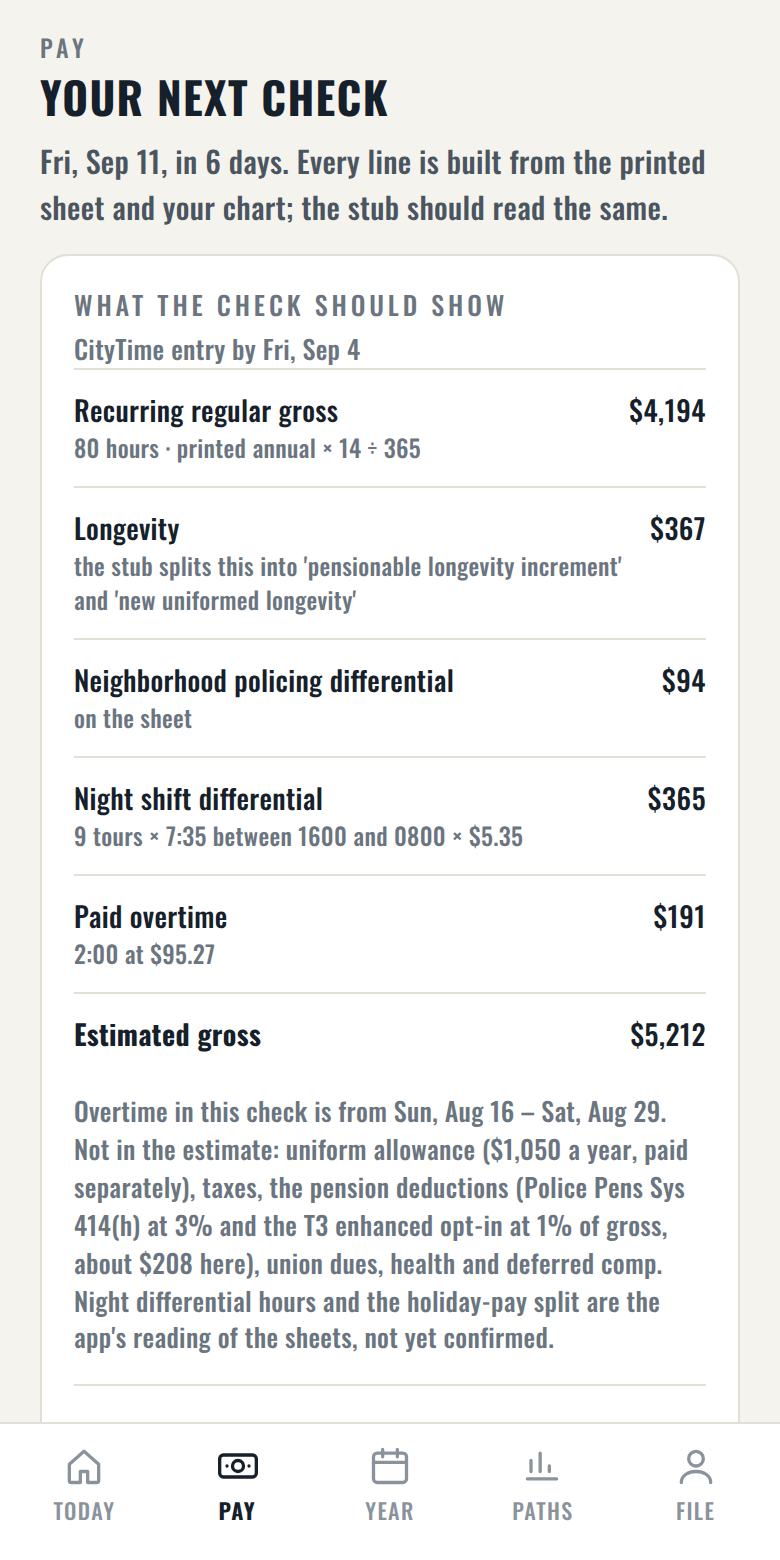
See the check before it arrives
Recurring regular gross, longevity, differentials, night shift differential, holiday pay and paid overtime, each from the sheet and the pay calendar. On pay day, type the gross from your stub and the app checks its arithmetic against the City's.
Know what still counts
Overtime raises your pension only if it lands inside the final-average window, and each year in the window is tested against 110% of the average of the two before it. The app walks that rule year by year, month by month if the window is not a calendar year, so you can see which hours move your pension and which are just pay.
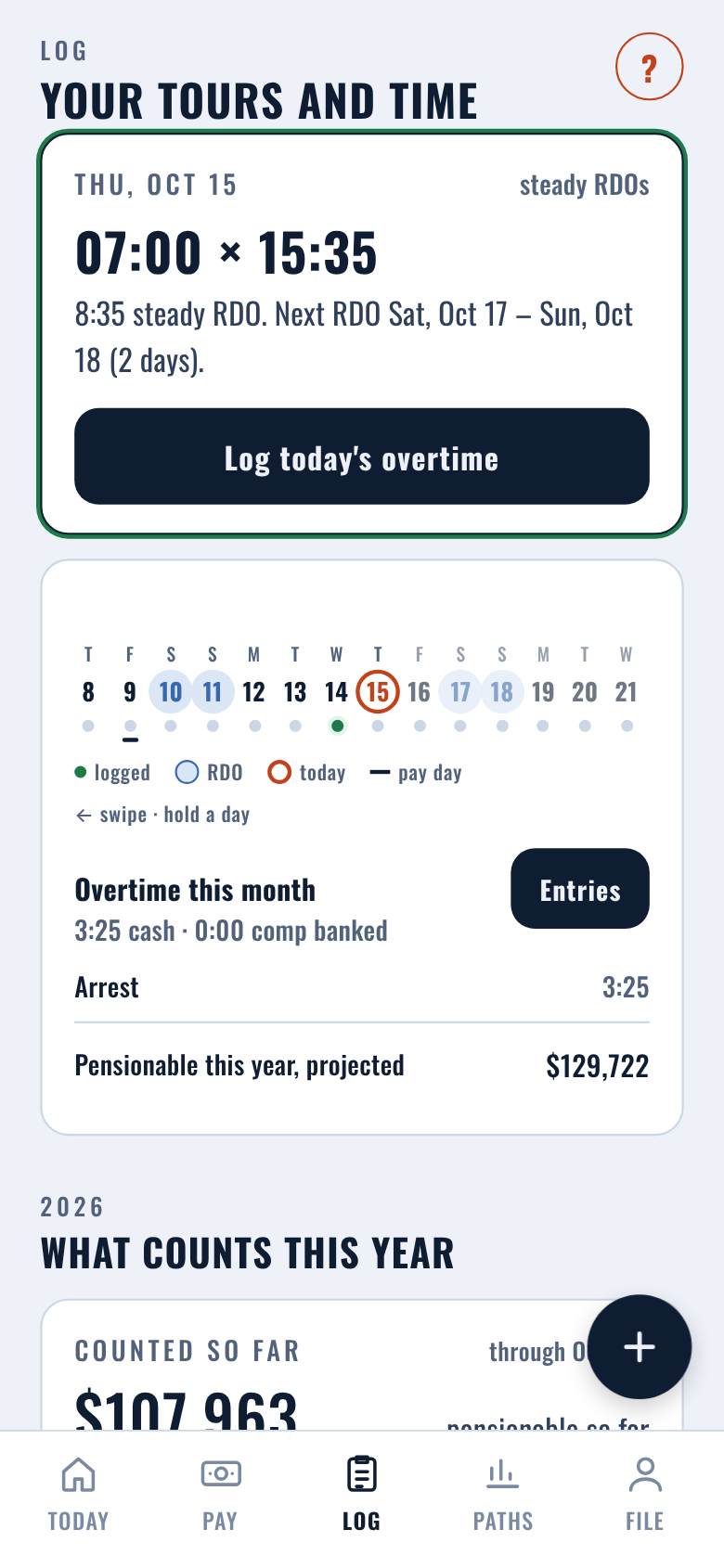
When can I go
Pick a year from twenty to twenty-five and see the monthly figure, the last tour, terminal leave from your banks, the first payment, and how much escalation you have earned. Or pick the exact day you want to come off the payroll, and the app counts how much banked time has to carry you there (captains: nine-hour tours in the first year in rank, eight after). Vesting out today and every promotion pairing are priced side by side, and each figure has a plain sentence next to it saying what it is and what it is not. Leaving at twenty and starting the pension later is there if you turn it on, with what the wait costs you.
Should I take the promotion
Pay on day one at the step you would actually be placed on, chart days and vacation, the longer tour priced on real appearance counts, and what the new rank does to the pension at your chosen exit. A rank reached after your last tour changes your pay, not this pension, and the app says so.
Every figure shows its source
Figures carry a small marker; tap it and the app names the document behind it. Where a document leaves a point open, the figure carries a † and the app says what it assumed. Any forecast raise is labelled as a forecast and is off unless you turn it on.
Your Fund statement comes first
The Police Pension Fund decides the actual figures. Enter the service to date from your annual or on-demand Fund statement, and for Tier 3 the three-year average, and the app starts from the Fund's numbers. It still shows its own reading beside them, so if the two differ you can find out why: a missing year of earnings, a buyback, days off the payroll.
Pay history, contract by contract
Salary sheets for every rank back to 2017, so earlier years are checked against the rate in force at the time. A retroactive contract payment is placed in the months it actually covered, not the year it landed in your check, so it lifts the right years of your final average.
Your pension statement, checked
Copy eight fields from your annual or on-demand Fund statement and the app marks, line by line, where its own reading matches the Fund's and where it differs: service to date, the vested and service-retirement dates, the three-year average, the vested benefit. A gap is something to ask about before you file, not after.
Start from your own records
The app tells you exactly where each number lives, and reads the ones it can: the Employment History letter from ESS for your dates and each year's pay, a pay statement for your step and banks, the overtime record for the hours you have already worked this year. Nothing is uploaded anywhere; the reading happens on the phone.
Your next exam, dated
The promotion ladder follows the exam notices: when you can sit the next test, when you could be promoted, and what each rank above you would do to the pension at your chosen exit. Sergeant to lieutenant, officer to detective, sergeant to SDS, and the rest.
Free to download. One purchase opens the full report.
Today, Pay, Log, the overtime report, your final average and the pension at twenty are free, for good. The full report is a one-time purchase through the App Store or Google Play, $19.99 for the first two weeks after launch and $24.99 after, no subscription: it opens the side-by-side figures for every exit, pick-a-date, the exam and promotion dates, and the leave-at-twenty-and-wait row. No ad network, no tracking, no account.
Log the tour. The slip writes itself.
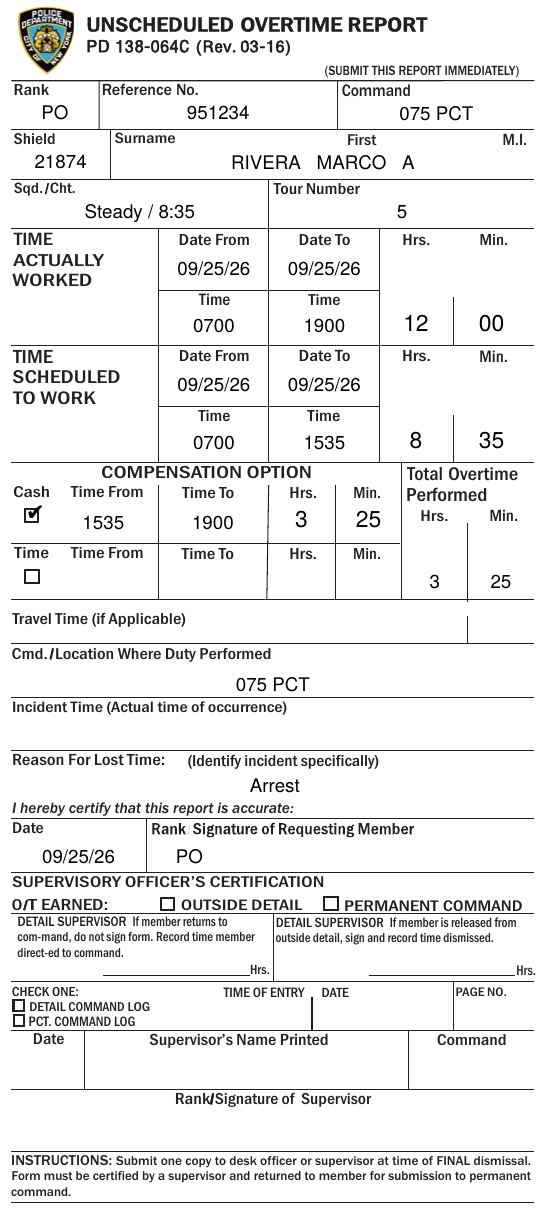
Every tour you log can become the Department's own overtime report, filled in from the entry on your phone and handed to Mail, Files or a printer. Shown here with a sample police officer; nothing in it is a real member's.
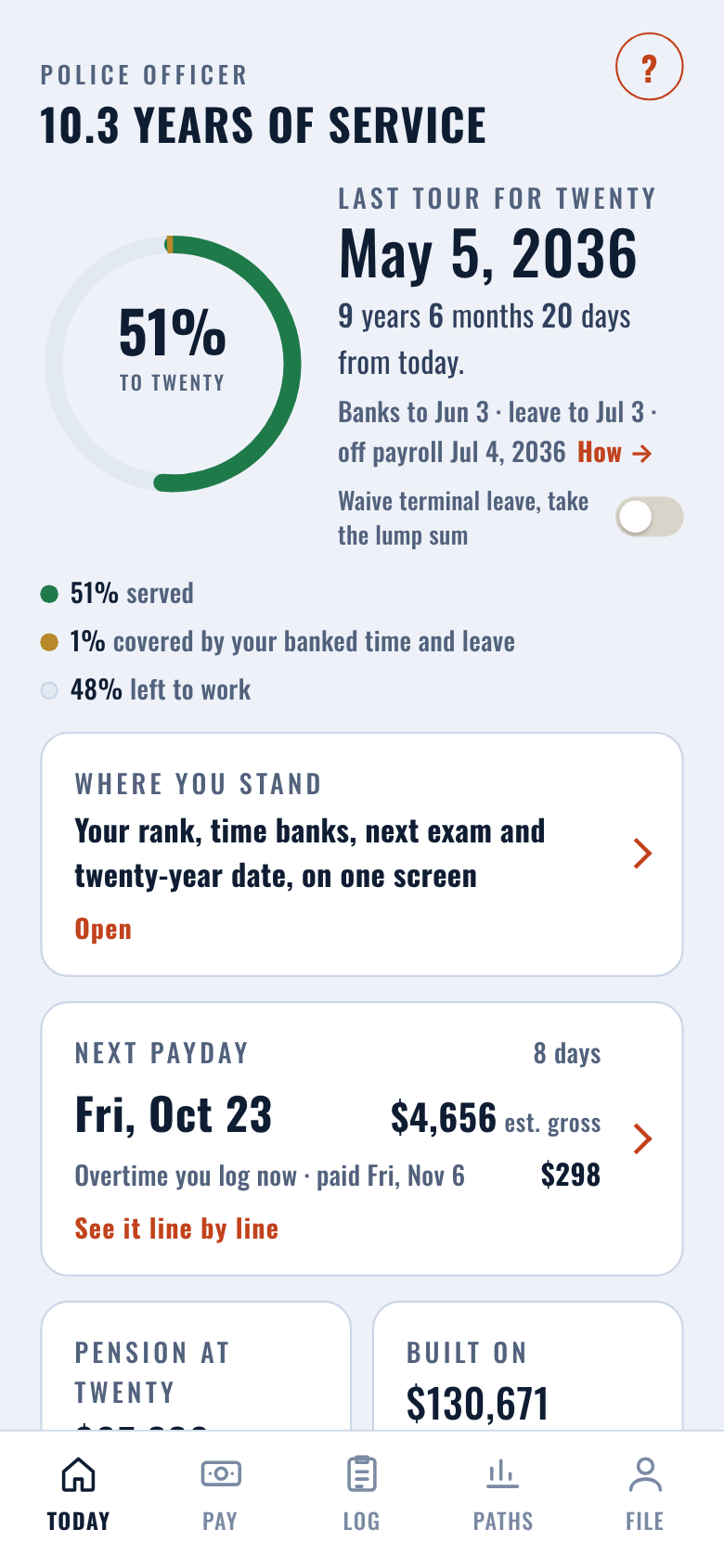
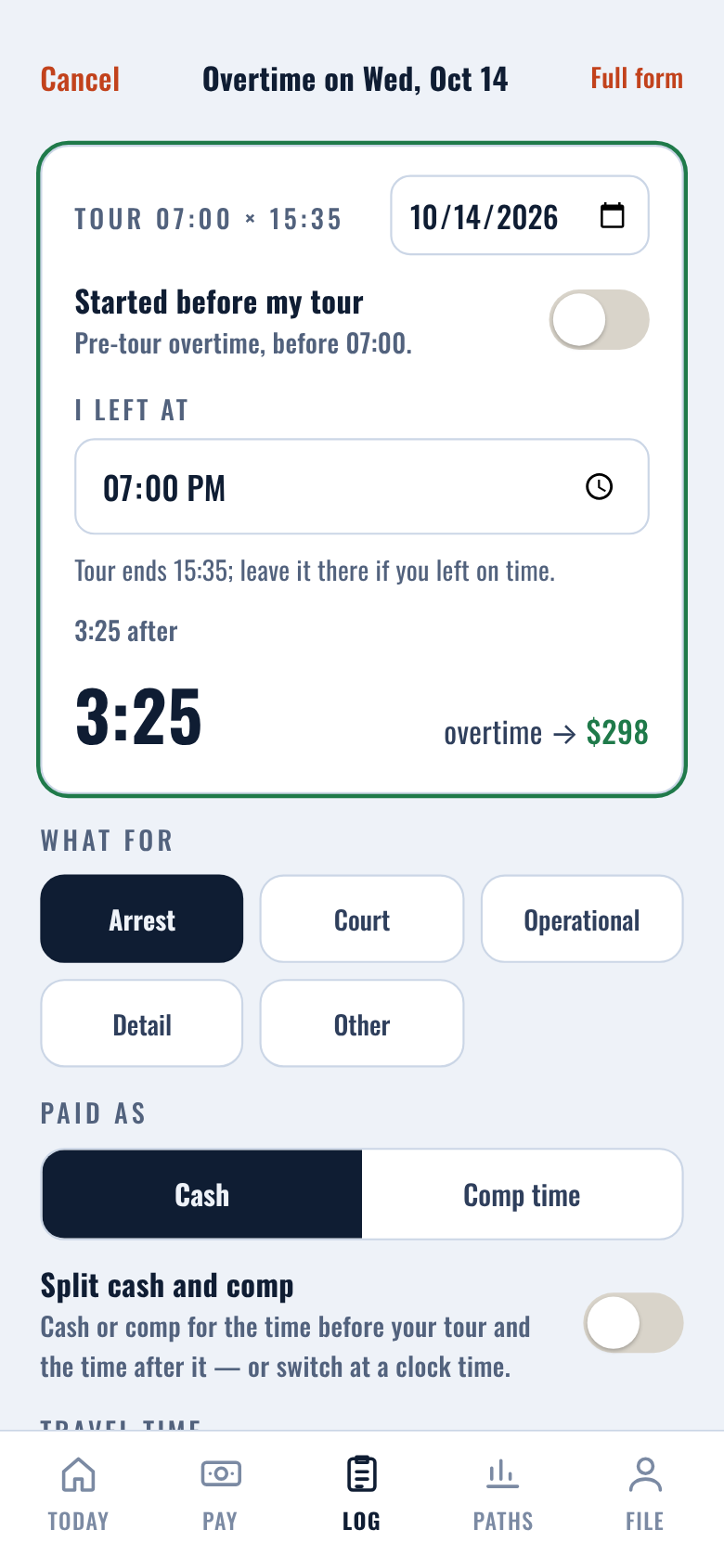
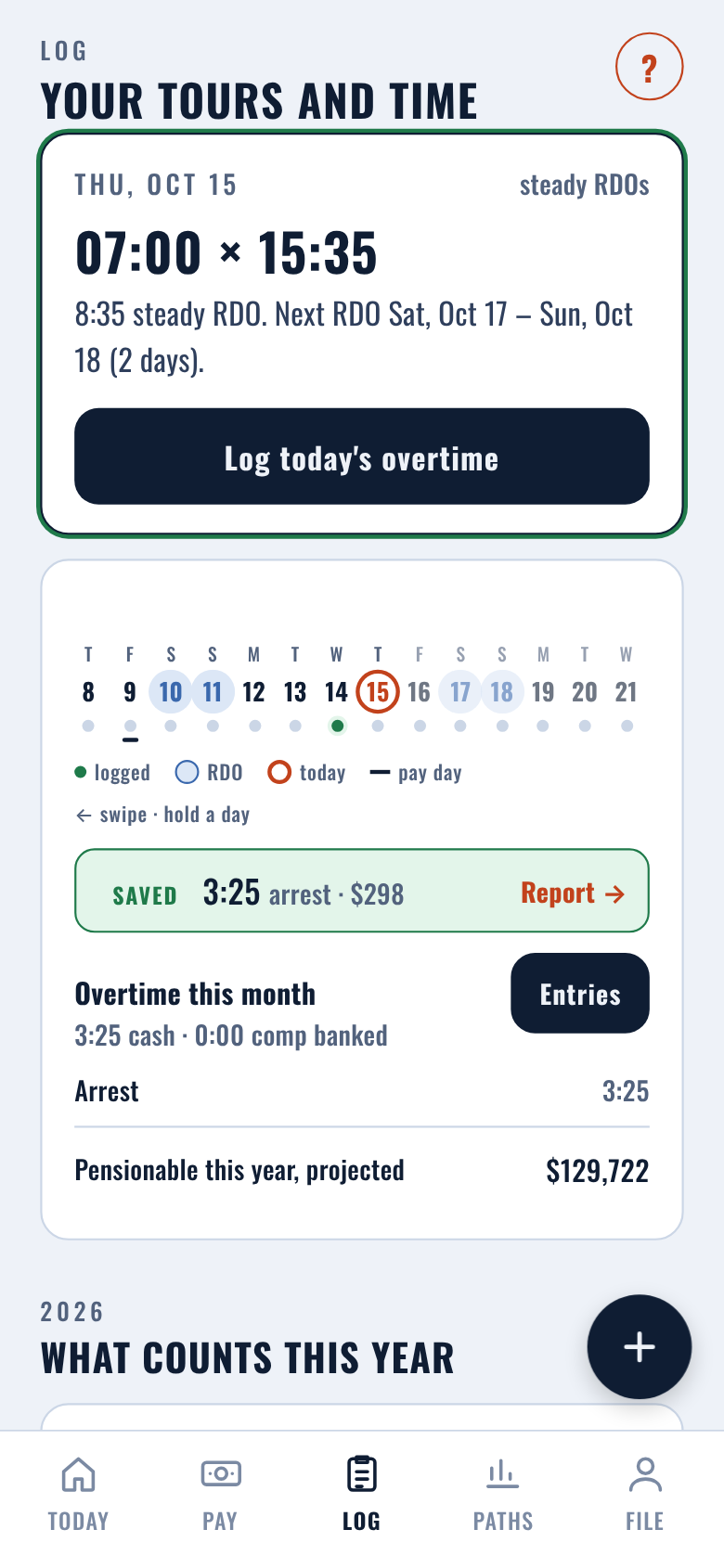
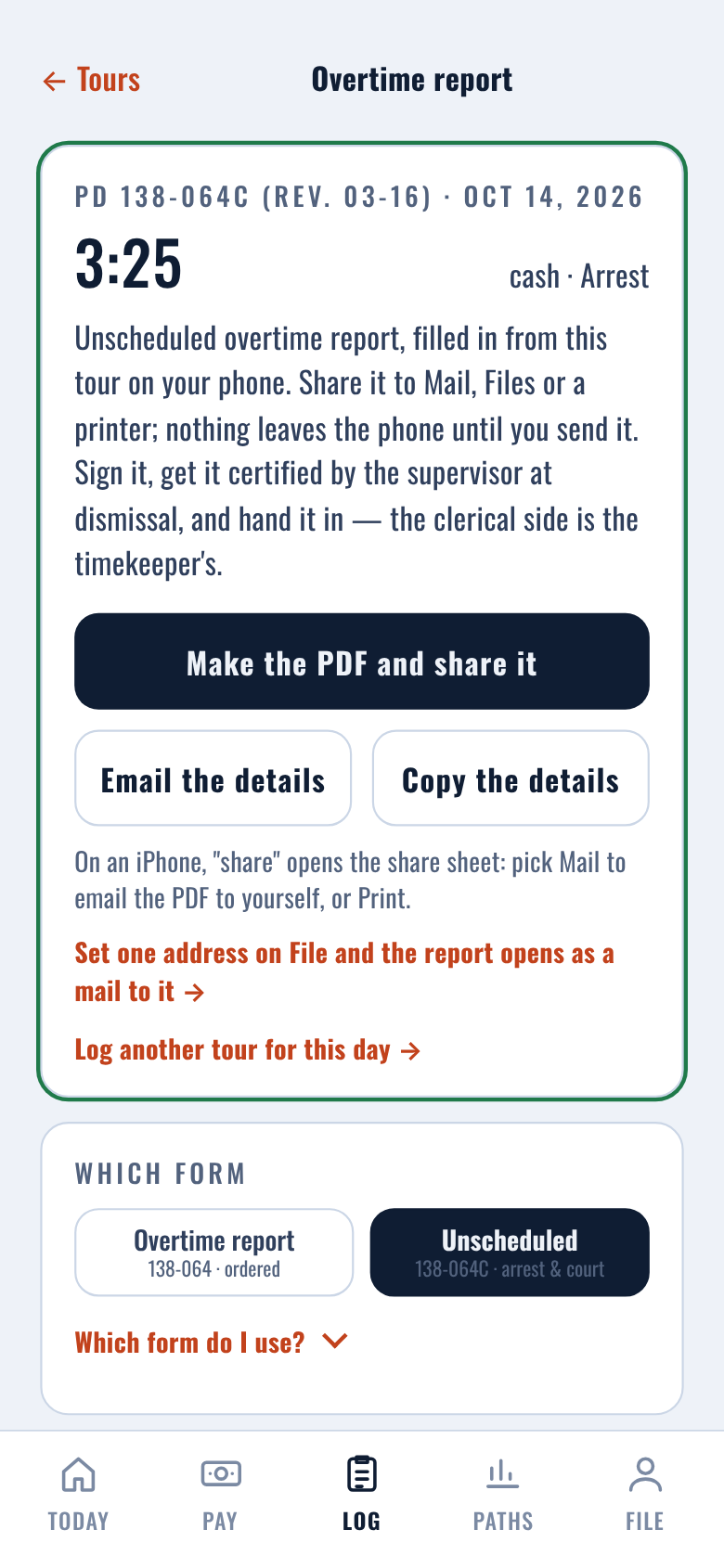
Held over? Open Log, tap +.
The Log tab already knows today's tour from your chart. Say when you left.
What for, cash or comp. Save.
The hours are priced at your printed rate and dated to the check they land in.
It lands on Log. Tap the entry.
The tour settles into the month, the next-check estimate on Pay and the year's line. Tap the saved entry and the report opens.
Your details are already on it.
Entered once, kept on the phone. Only the tour number changes. One tap makes the PDF.
The Department's own form, filled in.
PD 138-064 for ordered overtime, 138-064C for arrests and court, 138-064D for investigative units. Every box comes from the entry.
Sent to you.
The share sheet opens: mail it to yourself, print it, or save it to Files. Set your own address once on File and the report opens as a mail to you. Sign it, get it certified at dismissal, hand it in. Nothing leaves the phone until you send it.
The clerical side is left for the timekeeper. The forms are the Department's PD 138-064, 138-064C and 138-064D (Rev. 03-16); the app fills the member's side and never the timekeeper's.
There is no account and no company server.
What you type is saved on your phone only, like a note in your Notes app. We cannot see it; neither can anyone else. We never ask for your ESS login, and we never will: the app shows you where each number lives on your pay statement and your annual statement so you can enter it yourself. Delete the app and it is gone; there is nothing to recover and nothing to unsubscribe from. The full privacy statement is one page.
Built from the documents, not from rules of thumb
The calculation engine is the product. Every formula in it is traced to a document, and where a mechanic is not written down the app marks the figure and says what it assumed.
- Pension rulesThe Police Pension Fund's Tier 3 and Tier 2 Summary Plan Descriptions (June 2026), Article 14 of the Retirement and Social Security Law, the Administrative Code, and the Office of the Actuary's valuation report.
- PayThe Office of Labor Relations salary schedules for police officer, detective, sergeant, lieutenant and captain, each carried with its issue date and kept back to 2017, and the City's biweekly pay calendar.
- SchedulesThe Department's duty-schedule and vacation orders for every rank and the squad rotation calendar. The app says which order each chart rule came from.
- Where the documents stopA small number of mechanics are not written down anywhere a member can read. Where a figure depends on one, it carries a †, and the app explains what it assumed and why. When the point is settled in writing, the mark comes off and the changelog records it.
Sources current as of 15 October 2026. The source list and where the legislation stands.
The rules move. The app moves with them, and says so.
Every bill that would change a Tier 3 figure is carried in the app as a switch, labelled as a bill, never as law, until it is enacted. Three things worth knowing this month:
Fire members got escalation at twenty. Police members did not.
In 2026 the fire unions won the removal of the 25-year requirement for Tier 3 escalation: a firefighter who retires at twenty becomes eligible for full annual escalation the following month (A.10254 / S.9203). A police Tier 3 member who retires at twenty still waits to 25 for full escalation, and to 22 for the first partial step. Few members know this happened. It is now the largest single difference between the two departments' plans, and exactly the kind of figure the app exists to put in front of a member. Read the entry →
Signed into law, 28 September 2026
Mandatory retirement at 65. Chapter 311 of 2026 (S.5053-B / A.8178-B) raises the mandatory retirement age for uniformed members of the Police Pension Fund to 65, Tier 2 and Tier 3 alike, effective immediately. For Tier 3 it had been 62. Tier 2 salary base. Chapter 312 of 2026 (S.7808-A / A.8322-A) gives Tier 2 members appointed on or after 1 July 2000 the greater of their final twelve months or their best three consecutive years, for retirements on or after 28 September 2026. Both postdate the June 2026 plan summaries; where they differ, the statute governs. Repeal of the Social Security offset at 62 (S.7975-B) is still in committee and stays a switch in the app, off by default. The full list →
What this becomes with your answers
Today the app reproduces every printed figure in the plan summary and the salary schedules, and it is honest about the handful of mechanics that are not written down anywhere a member can read them. With those mechanics confirmed in writing by the Fund, every remaining mark comes off and the app becomes something the Fund has never had: a way for every member to see their own path to retirement, worked from the Fund's own rules, before they walk into the Pension Section.
Fewer wrong questions at the counter
A member who has already seen their final-average window, their escalation dates, their terminal leave and their loan reduction — with the page each one came from — arrives with a specific question instead of a general worry. The app does the explaining the Fund's staff repeat a hundred times a week.
Nothing for the Fund to host, store or secure
There is no server and no member database. The member's figures live on the member's phone, entered by the member from their own statements. The Fund's data stays with the Fund; the app only carries the published rules.
Rules versioned, not remembered
Every rule carries its source and issue date, and the app keeps a dated changelog. When the Fund publishes a new plan summary or a bill is enacted, the figures update and the member is told what changed and why.
The official number stays the Fund's
Every screen says so. The app is a modeling and education tool that points members to the Fund for the calculation that counts; it is built to reduce the Fund's workload, not to compete with its authority. When a member enters the figures from a Fund statement, the app works from the Fund's numbers, not its own.
We would welcome the Fund's review of the mechanics the app relies on, and the same conversation with the unions and delegates who represent those members. support@noventraconsulting.com
Try it before it is in the App Store
Route to Twenty is in a closed beta with active police members. Leave an email, your rank and your tier and we will send an invitation as places open. Tier 2 and Tier 3 members are both welcome; Tier 2 is new, so a tester who can compare it with a Fund estimate is especially useful. We use the address for the invitation and nothing else.
Before you ask
Is this the Pension Fund's number?
No. Route to Twenty is a modeling and education tool. It works from the same published documents the Fund works from, and it shows you the page each figure comes from, but the only official calculation is the one the NYC Police Pension Fund makes for you. Treat every figure here as an estimate.
Which tiers does it cover?
Both. Tier 3 means members appointed on or after 1 July 2009. Tier 2, members appointed before that date, was added in October 2026 and is in testing: 50% of the salary base, the sixtieths for each year past twenty, the banked Variable, and your contribution account with the ITHP waiver, the 50% additional, loans and the final withdrawal. Say your tier on the beta form.
Do I have to give it my ESS login or my pay stubs?
No, and it will never ask. You type a handful of figures yourself — your appointment date, rank and step, and each year's earnings — and the app shows you where each one is printed: the Employment History letter you can download from ESS, a pay statement, your Fund statement. Where it can, it reads the number off the document for you, on the phone. Nothing you enter leaves the phone; there is no account and no company server.
Which years does the app use for my final average salary?
Whichever is higher: the best three consecutive calendar years, the 36 months immediately before retirement, or any other 36 months in a row — the app checks every run, as the Fund does, and tells you which one it used. In any year that is more than 10% above the average of the two years before it, the excess is left out (Tier 3 SPD). For Tier 2 it is the higher of the final 12 months or the best three consecutive years, with a 20% limit. For Tier 3, if you enter the figures from a Fund statement, the app starts from the Fund's own three-year average.
Can I leave at twenty and start my pension later?
Some members plan to, so the pension starts with escalation at what would have been 22 to 25 years. Know what the wait costs first: no pension check, no Variable Supplement and no City health insurance for you or your family until the first check, and the plan summary says there is no death benefit during the wait. How a pension that starts later is worked out is not yet settled in writing, so the app marks this path not confirmed and shows it only if you turn it on. Ask the Pension Fund about it when you file.
What does the † next to a figure mean?
That the figure rests on a point the published documents do not fully settle. Tap it and the app says what it assumed and why. When the point is settled in writing, the mark comes off and the app's changelog records it.
Who is behind it?
Noventra Labs LLC, a New York company. The product was built on one engineering rule: every formula cites its page, and where a document is silent the figure says so. It is not affiliated with, endorsed by, or an agent of the New York City Police Department, the Police Pension Fund, the City of New York or any union. Write to support@noventraconsulting.com.
What does it cost?
The app is free to download, and the free version is complete for what it shows: Today, Pay, Log, the overtime report, how your final average is built and the pension at twenty. The full report is a one-time purchase, made through the App Store or Google Play: $19.99 for the first two weeks after launch, $24.99 after that, and it stays unlocked on every phone signed in to the same store account. No subscription, no ad network, no tracking and no sale of data, because the app has no data to sell.
What is in the full report?
The side-by-side figures for every exit from vesting out today to leaving at twenty-five, with the promotion pairings; pick-a-date, which counts the banked time a chosen retirement date takes; the exam and promotion dates on At a glance; and the leave-at-twenty-and-wait row. Every locked card shows its layout with the digits hidden, so you can see what you would be opening before you buy it.
Small, specific, sourced
Noventra Labs builds tools that work out complicated rules exactly and explain them plainly. Route to Twenty is the first of them, built with one engineering rule: every formula cites its page. If you have a rule set that people keep getting wrong, we would like to hear about it.